RelayTune streams your Mac's system audio straight to any Sonos speaker on your network, no AirPlay picker required. Works even on speakers that never had AirPlay 2 at all.
5-day free trial. No card required. macOS will show a security warning on first launch — here's why, and how to open it.
Even with AirPlay 2, sending your Mac's audio to a Sonos speaker means opening the AirPlay picker and doing it all over again next time. RelayTune skips AirPlay entirely — point it at any Sonos speaker on your network once, and your Mac's audio just goes there.
It's also the only way to do this at all on speakers that never got an AirPlay option in the first place:
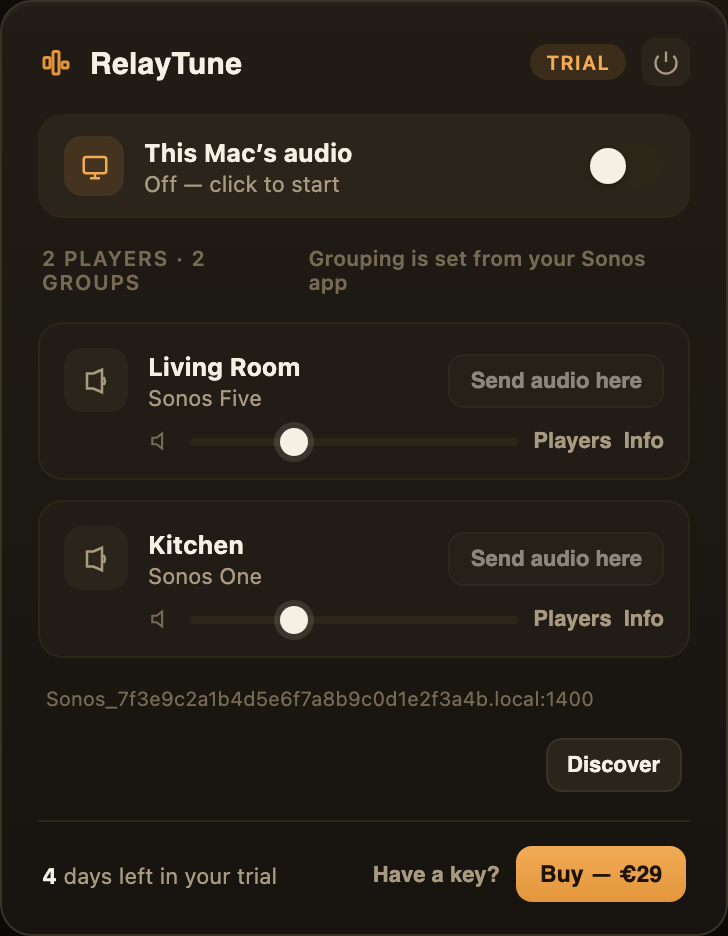
RelayTune discovers every Sonos speaker on your Wi-Fi automatically — no setup, no accounts.
One click in RelayTune sends everything playing on your Mac to your speakers — switch off anytime.
Audio reaches your speakers in one to three seconds — great for music, playing right there in the room.
Built for music, not video. That one-to-three-second delay is unnoticeable for a song, but it will be visibly out of sync if you try to watch a video with the picture on your Mac.
Not just a browser extension. A few Chrome extensions can stream one tab to newer Sonos speakers, but only that one tab, only speakers running S2, and usually a monthly subscription. RelayTune's small helper app is what lets it also stream your whole Mac's audio and reach speakers that never got a software update at all — for one price, once.
Apple Silicon Mac. Intel Mac instead?
Already tried it? Buy now, skip the trial.
Which speakers does this work with?
Every Sonos speaker on your network — including ones with AirPlay 2. It's the only option at all for speakers that never got AirPlay 2, like Play:1, Play:3, first-generation Play:5, Connect, and Playbar. Either way, it uses your speakers' existing Sonos network, no extra hardware.
Will this work for watching video?
No. Expect one to three seconds of delay, which is fine for music but will be noticeably out of sync with video.
Do I need a subscription?
No. €29 once, and it's yours — including every 1.x update, for as many of those Macs as you use it on (up to 2).
Why do I need to install an app? Why not just a browser extension?
Browser-extension-only tools for Sonos exist, but a browser extension genuinely can't capture your Mac's system audio, discover speakers on your network, or run the small server your speaker connects to — none of that is something a browser extension is allowed to do, on any computer. RelayTune's helper app is what makes system audio (not just one tab) and true legacy-speaker support possible, without needing a monthly fee to pay for a server.
What if it doesn't work for me?
Try it free for 5 days first. If you buy it and it's not for you, refund within 14 days — no questions asked.
macOS says it can't verify the app — is that normal?
Yes. RelayTune isn't (yet) signed through Apple's $99/year Developer Program, so the first launch shows a Gatekeeper warning — a few clicks in System Settings and you're through it, only once. Here's exactly why, and the four clicks to get past it.
RelayTune is an independent product, built by Studio Stuurman. It is not affiliated with, sponsored by, or endorsed by Sonos, Inc. Sonos and the names of Sonos products mentioned on this page are trademarks of Sonos, Inc.